Assessment of the
ICDPR Information System Danubis
Authors
Contracting Body
Stefan Schwarzer
UNDP/GEF Danube Regional Project
Sylvain Ponserre
Vienna
Version 1.0
19-07-2004
DEWA/GRID-Geneva, 11, Chemin des Anémones, 1219 Châtelaine, Geneva, Switzerland
tel. [4122]917 82 94, fax. [4122]917 80 29, email. Info@grid.unep.ch
Assessment of the ICPDR Information System Danubis 1
1 EXECUTIVE SUMMARY
3
2 INTRODUCTION 4
3 HISTORY OF THE DEVELOPMENT OF THE ICPDR INFORMATION SYSTEM 7
4 THE USER-PERSPECTIVE
9
4.1 ACTUAL SITUATION
9
4.2 USER GROUPS 10
4.3 USER NEEDS
10
5 INFORMATION SYSTEM COMPONENTS
12
5.1 ORGANISATION SYSTEMS 12
5.2 LABELLING SYSTEMS 14
5.3 NAVIGATION SYSTEMS 17
5.4 SEARCHING SYSTEMS 20
6 FEATURES & FUNCTIONALITY
22
6.1 VISION AND GOALS 22
6.2 STANDARDISING DOCUMENT STRUCTURE 22
6.3 HOMOGENEITY 23
6.4 PERSONAL HOMEPAGE 24
6.5 LANGUAGE SETTINGS 25
6.6 DISCUSSION FORUM 26
6.7 REPEATED ITEMS 27
6.8 NAVIGATION
27
6.9 STRUCTURE
29
6.10 FEATURE LIST 29
6.11 QUALITY CONTROL 30
6.12 LONG-TERM STRATEGY 30
6.13 COMMUNICATION 31
6.14 DATABASES
31
6.15 LAYOUT
32
6.16 PEOPLE
32
6.17 GEOGRAPHY 33
6.18 ACCESSIBILITY 33
6.19 INTRO TEXTS 33
6.20 HOMEPAGE
34
6.21 MANAGEMENT STRUCTURES 34
6.22 UP-TO-DATEDNESS 35
6.23 SEARCHES
35
6.24 DOCUMENT SIZES 35
6.25 HELP SYSTEM 36
6.26 METADATA
37
7 RECOMMENDATIONS 40
7.1 CLARIFY THE USER NEEDS 41
7.2 REDEFINE YOUR GOALS 42
7.3 DEVELOP A CONCEPTUAL MODEL 42
7.4 REORGANISE THE STRUCTURE 42
7.5 SIMPLIFY THE DESIGN 42
DEWA/GRID-Geneva, 11, Chemin des Anémones, 1219 Châtelaine, Geneva, Switzerland
tel. [4122]917 82 94, fax. [4122]917 80 29, email. Info@grid.unep.ch
Assessment of the ICPDR Information System Danubis 2
7.6 REVISE THE SEARCH 43
7.7 REVIEW THE DATABASES 43
7.8 GENERATE A FEATURE LIST 43
8 ANNEX I: FEATURE LIST
45
DEWA/GRID-Geneva, 11, Chemin des Anémones, 1219 Châtelaine, Geneva, Switzerland
tel. [4122]917 82 94, fax. [4122]917 80 29, email. Info@grid.unep.ch
Assessment of the ICPDR Information System Danubis 3
1 Executive summary
UNDP/GEF Danube Regional Project, which is a partner of the International
Commission for the Protection of the Danube River (ICPDR), contracted
UNEP/GRID-Geneva to review and evaluate the existing ICPDR information system
(IS) called "Danubis", to define its strengths and weaknesses in order to give guidance
and recommendations for its further development. The work carried out is based on
research on their audiences, contents and an understanding of the project's strategic
focus. The main emphasis of the evaluation was placed on the ,,Internal working area"
of the IS, but includes also the public part.
The current, web-based information system allows the technical experts and
partially the public access to information made available through the International
Commission for the Protection of the Danube River (ICPDR). This includes most
notably textual documents that are associated with ICPDR meetings, taking place at
regular intervals, which are either preparatory or terminating in origin. As a matter of
fact, documents are mostly prepared and published (within Danubis) by the Technical
Experts (TEs) of the Expert Groups (EGs) located at Headquarters in Vienna, and
then downloaded by the users.
The IS has evolved with its own dynamic over the years, without having a proper
and sound information architecture (IA) as a basis that would ensure the reliability
and consistency of the system. At the same time, considerable effort has been
undertaken to improve the functionality and ability of customisation of the "Internal
Working Area". But although there is a great deal of valuable content, the four major
components which form an IS the organisation, labelling, navigation and searching
systems are poorly developed and not explicit as such components should be.
Consequently, our strategic recommendations are as follows:
- Develop a solid architecture, by paying special attention to these four principal
components.
- Concentrate on the user needs and render the usability of the system as easy as
possible, since Danubis is much used by thematic, but not evidently technically-
skilled, experts.
However, the decision taken already by the ICPDR Secretariat to develop a new
Content Management System (CMS) in order to enhance usability, improve flexibility
and ensure a wider acceptance of the system neither addresses nor resolves the root
causes as mentioned above. Although the current software used limits certain
developments and hinders basic organisation, labelling, navigation and searching
issues, the most evident obstacles are produced internally, that is by not applying most
vital rules and strategies of an IS.
By applying the recommendations in this report to develop the strategically
important foundations of an information system, Danubis will make it easier for users
to browse and find information. It will result in a higher level of user satisfaction,
which in turn will encourage the same persons to more regularly access the system.
DEWA/GRID-Geneva, 11, Chemin des Anémones, 1219 Châtelaine, Geneva, Switzerland
tel. [4122]917 82 94, fax. [4122]917 80 29, email. Info@grid.unep.ch
Assessment of the ICPDR Information System Danubis 4
2 Introduction
For the evaluation of Danubis, an inception meeting was held on the 9th
June 2004 in Vienna, consisting of an introductory and a closing session, plus
several individual consultations with the ICPDR Technical Experts (TEs) at
ICPDR headquarters.
Participants of the group sessions were Phil Weller, Ivan Zavadsky, Marcella
Fabianova, Karoly Futaki and Alex Hoebart. The interviews have been
conducted with Igor Liska, Michaela Popovici, Jasmine Bachmann, Ursula
Schmedtje, Karoly Futaki and Alex Hoebart.
Per the ToR, factors to be taken into account for assessing the strengths and
weaknesses of the Danubis IS, are:
the existing visions and goals for the project activities and especially for the IS;
·
Have the visions and goals been defined? Are they still accurate? Are they exact
enough to base an IS strategy on or are they too general?
·
Who is the user? Are they well defined? How many different groups in terms of
"technical" as well as "thematic" expertise are there?
the existing structure and the design of the IS;
·
Is the site attractive to users?
·
Is the site well structured1?
·
Are the components of the site organised in a meaningful way and divided into
distinctive, self-explanatory, homogenous categories?
·
Are these categories and the links leading to them logically and correctly labelled?
·
Is the navigation logic and easy to follow?
the availability of functions of the IS;
·
Do the functions meet the user's needs? Are there too many? Not enough?
·
Are the functions easy to find? Is it easy enough even for non-experienced users to
use these functions? Are they well documented?
·
Are there functions which are used only by a minority? Which functions are used by
most of the users?
the quantity and quality of the content;
·
Are the documents2 relevant for the project?
·
Are they up-to-date?
·
Is there old, obsolete, out-of-date information3?
·
Is the information well documented?
·
Are the fields of the metadata well chosen? Are they completely and correctly filled
in?
the use of the system by the key institutional users;
1 "Structuring involves determining the appropriate levels of granularity for the information "atoms" in the site, and
deciding how to relate them to one another." (L. Rosenfeld & P. Morville, "Information Architecture", 2002)
2 Documents encompass all sorts of content items, such as Word files, Excel sheets, images, databases, articles,
etc.
3 Information and documents is sometimes used in the same sense, thus information means all sort of "stuff" hold by
the IS
DEWA/GRID-Geneva, 11, Chemin des Anémones, 1219 Châtelaine, Geneva, Switzerland
tel. [4122]917 82 94, fax. [4122]917 80 29, email. Info@grid.unep.ch
Assessment of the ICPDR Information System Danubis 5
·
Does the defined audience use the system? If not, why not? Is it because people are
overloaded with other work? Because they are not paid for this work? Because there
is a "mental barrier"?
the structure, content, purpose and use of the databases;
·
Who is the intended user group? Are they satisfied with the given IS elements?
·
Can apart from the experts "normal" users reasonably use it?
·
Is the functionality enough or too complex? Can perhaps the design be ameliorated
in order to enhance usability?
·
Are the data kept up to date?
existing organisational set-up and management of the IS.
·
Does the organisational structure enable/facilitate/complicate the use of the system?
What are the implications?
·
Are the tasks clearly defined and agreed upon?
·
Where does the quality control take place? Are there managers checking the
content? Are there communicators, facilitators?
Additionally, several other questions need to be raised and answered, building
another main pillar for the evaluation analysis. They encompass the whole process of
assessment, and have (partly) been raised in the interviews and used during the whole
review process.
·
What are the limitations, what the strengths of the current system?
·
What worked in the past? What didn't?
·
What do you expect from a new system?
·
What are the short- and long-term goals?
·
What's the schedule and budget?
·
Who are the intended audience(s)?
·
Why will people come to the site? Why will people come back? Why would they
share their information on the site?
·
What is the purpose of the content? What format does it have? Is it dynamic or
static? How is it created and managed? Who maintains it?
·
What type of tasks should users be able to perform?
For the interviews themselves, a list of more specific questions in addition to
those above has been utilised. This was not a very rigid questionnaire that had to be
followed, nor was it exhaustive. Often, users share their views, experiences and
impressions in a more open and personal form, when the interviewer does not stick
very closely to a formal questionnaire..
·
What is your job? And what is your role within the ICPDR?
·
Since when are you using the system? How often per week or per month?
·
What parts of the IS do you use? How? What information do you retrieve?
·
Was it easy for you to find this information?
·
Which functions of the IS do you use? Which functions don't you use?
·
Are you satisfied with the current IS? Do you have any criticisms? Do you have any
suggestions for improving the IS?
The following aspects are introduced to better understand this evaluation report
and how it was prepared. In order to better understand the method used for
identifying the strengths and weaknesses of the IS, several theoretical chapters have
DEWA/GRID-Geneva, 11, Chemin des Anémones, 1219 Châtelaine, Geneva, Switzerland
tel. [4122]917 82 94, fax. [4122]917 80 29, email. Info@grid.unep.ch
Assessment of the ICPDR Information System Danubis 6
been included. These are to explain the basics aspects of the overall design, and are
also used as a basis for the current analysis.
In general, psychologic and mental aspects can never be underestimated in the
design and use of web sites. Different personal backgrounds, distinct levels of
experience and use, different technical skills etc. all play a very important role in the
success or the failure of an IS. There is thus not one general solution to a problem.
When something in this document is marked as "irritating" or "confusing" or
criticisms are reported, then this can be a very personal impression. Other users might
see it differently, understand the structure more easily, find the documents faster, and
don't get irritated by the navigation. But, as someone who took the time to
understand the structure and the content of Danubis, it may point out weaknesses.
Why should someone else, perhaps even less familiar with the system, will not have the
same problems of understanding then others? Thus, in short, questions of the
following type are to be ignored: "But why didn't you find this and that? It is right
there!", or "Why is it confusing? It is so easy to use this or that function!" In this
report, when weak points are presented, it is mostly because there were several
problems using the system, or we judge that others will have similar difficulties.
DEWA/GRID-Geneva, 11, Chemin des Anémones, 1219 Châtelaine, Geneva, Switzerland
tel. [4122]917 82 94, fax. [4122]917 80 29, email. Info@grid.unep.ch
Assessment of the ICPDR Information System Danubis 7
3 History of the development of the ICPDR
Information System4
The development of the ICPDR Information System started in 1999. At that time,
Windows NT and Oracle Database Server have been provided by the Austrian
Government as an input and used as the system's platform.
Oracle was chosen as the system's underlying database because of it's reliability,
scalability and security. As a logical consequence, Oracle WebDB was added. This tool
highly integrates with the Oracle database and provides ready-to-use tools for managing
a website and developing and deploying database applications.
Based on these components, the system was built up: a public website, an internal
working area for sharing information among experts and database applications for
water quality, emissions and other purposes.
Later, Oracle integrated WebDB in their Oracle Application Server, changed its
scope and renamed it to Portal. With this new release, Oracle has added specific
features for the creation and management of centralised business portals.5
Although the mentioned changes were not useful in the context of the ICPDR
Information System, the migration from WebDB to Portal was done in 2002 to take
advantage of other improvements and bug fixes for common features, such as user and
group access management, content management and control of the layout. The
migration turned out to be relatively complicated and many customizations had to be
adapted to the new structure. Additionally, the overhead of the Application Server
installation is considerable, as many components have to be installed which are not
used later.
This already shows the dependency on Oracle's market strategy, because of which
WebDB had to be replaced by the more complex and costly Oracle Application Server.
In 2003, the hardware platform was upgraded to meet the increased need for
capacity and connectivity. At that occasion, also the operating system was changed
from the then unsupported Windows NT to RedHat Linux6. The decision for this
change was based on the better stability and support of the Oracle software on the
Unix/Linux platform, saved license cost (for Windows 2000 Server), and increased
security (less virus threats). As Oracle Database and Portal are independent from the
operating system, this change could be done without any other implications to the
system.
4 taken from the ICPDR document "ICPDR Information System Development Strategy", Alex Höbart, 01/2004
5 So-called "portlets" can be made available to users of the web portal. Said portlets can be software applications,
reports, or Web pages, among other possibilities. Among those companies that provide customized portlets for
deployment are Autonomy, Ernst & Young, InfoSpace, and Net Perceptions.
6 Linux is a free Unix-type, open-source operating system which became a widely used platform for web servers in
the recent years.
DEWA/GRID-Geneva, 11, Chemin des Anémones, 1219 Châtelaine, Geneva, Switzerland
tel. [4122]917 82 94, fax. [4122]917 80 29, email. Info@grid.unep.ch
Assessment of the ICPDR Information System Danubis 8
But the hardware upgrade had implications on the cost of the software: the license
and support cost for the same software (Oracle Database and Application Server) was
increased considerably, as the pricing policy of Oracle is based on the power of the
underlying hardware platform.
In the same year, the system was further developed to increase it's usability and
training workshops for the users have been organised. Both activities revealed
shortcomings of Oracle Portal:
· Limited flexibility in the layout of the user interface:
The appearance of search results, folder contents, content management tools
and report parameter forms cannot be changed or only to a small extent, or
only with complicated workarounds (unneeded options which confuse the
users cannot be removed, custom options cannot be added). But this would be
necessary to make them more intuitive and user-friendly.
· Bugs in commonly used features (e.g. checking-out items, pagination of reports,
Excel export). ICPDR has reported 14 bugs in Oracle Portal to Oracle Support
in 2003. Only 4 have been solved by applying a software patch and 3 by
applying a work-around. 7 bugs were not solved and are still open or only fixed
in the next release. In difficult cases, the support reaction turned out to be
quite slow as different departments of Oracle have to be involved or even
inappropriate. Another problem is changing contact persons who are not
informed about the problem history which results in repetitive explanations.
· Limited support for national languages: currently supported languages for the
user interface are Czech, German, Hungarian, Romanian, Slovak and English
(and other languages not relevant for the Danube region). Oracle has no plans
to add more languages.
Instead of storing files in the file system, Oracle Portal stores them in the database,
creating additional complexity and hindering access by other common tools (e.g. anti-
virus software, FTP)
DEWA/GRID-Geneva, 11, Chemin des Anémones, 1219 Châtelaine, Geneva, Switzerland
tel. [4122]917 82 94, fax. [4122]917 80 29, email. Info@grid.unep.ch
Assessment of the ICPDR Information System Danubis 9
4 The user-perspective
An information system is worth nothing if there are no users or if the users, for
which the system had been developed, are not using it. So, one of the principal and
very key questions is:
Who are the users?
As in many cases in the development of larger IS sites, the "users" are a pretty
heterogeneous group of people, who are more or less closely attached to the
organisation that set up the IS and are involved on different levels in the projects.
Mostly, the range of users goes from the general public, over journalists and scientists,
to collaborators, technical experts and ministries.
All of them have self-explanatory different backgrounds and skills. An IS can
hardly satisfy the needs of all these (potential) users. So one must concentrate and pick
out no more than two or three groups that are essential or at least very relevant for the
work.
4.1 Actual
situation
In the case of ICPDR we can identify the following groups of (potential) users7:
·
president, heads of delegations, chairpersons of Expert Bodies;
·
ministries of participating countries;
·
technical and support staff of the Permanent Secretariat;
·
members of the Expert Bodies;
·
technical experts to the Expert Bodies;
·
project-related users and consultants;
·
observers;
·
special target groups like media, IFIs and donor organizations;
·
general public;
This list shows that, although the term "technical" has been mentioned a couple of
times, a minister (or probably his secretary) will still have other computer skills then
the TEs. This demands different requirements for the multiple user groups.
Next constraint the developers and administrators are confronted with: The user
community can be somewhat fluctuate. The collaborators are not necessarily the same
persons over the years. So, the `newcomers' must in theory be trained how to use
the system, as ICPDR did with the others. As this is linked with a lot of resource (time
and money), this is strong reason for keeping the IS simple and straightforward.
The consequences for the development and management of the IS are manifold. It
says: "The simpler, the better." The more functionality the IS offers, the more difficult
for the users the understanding is. Thus, this means conversely, that the more simple
7 partly from "Information Management Concept of the ICPDR", 01 to 02 December 2003, Vienna, Austria. Internal
Paper.
DEWA/GRID-Geneva, 11, Chemin des Anémones, 1219 Châtelaine, Geneva, Switzerland
tel. [4122]917 82 94, fax. [4122]917 80 29, email. Info@grid.unep.ch
Assessment of the ICPDR Information System Danubis 10
the IS is, the easier it is for the users to use the system. But: It is very difficult to
balance the amount of functionality and thus complexity with the level of needs by the
different user groups one wants to satisfy!
4.2 User
groups
A more general, task-driven distinction of the users in respect to the "use" of the IS
can be made by splitting them into:
·
The developer and administrator: This group is not very important within this
classification.
·
The Technical Experts from the ICPDR Secretariat: these people, located at HQ in
Vienna, use the IS to a high percentage for publishing documents. These can then
be download by group c). The documents are mainly meeting reports, agendas,
minutes and preparatory documents. One could entitle this group as the "active"
members.
·
The Expert Group members and other technical experts: These people learn of new
documents published in the IS often via email. They will click on a provided link and
download the document for local use (printing, reading, editing). One could entitle
this group as the "responsive" or better "passive" members. Some specialised users
from this group access the IS as well for querying the databases.
This definition will help us later to define the needs of the IS.
4.3 User
needs
As already mentioned in the chapter above, there seem to be mainly two needs of
the intended audience: uploading and downloading documents. In addition to this,
but completely separated by structure and functionality are those users who query the
databases.
So, the question to be answered is how these activities can be supported by the IS
in order to facilitate all processes and actions evolving around it, such as uploading
and downloading, browsing and searching, finding and accessing.
It seems that most of the users who access the Danubis know already what they are
looking for. They access the IS either irregularly in order to look for new documents or
get note by email that new documents have been published. So, very often no
extensive browsing and searching was necessary to find the needed piece of
information. Vice versa it can be postulated that further or additional browsing is
hampered by different reasons as explained in the following chapters.
Most users are familiar with the IS as they have been trained in how to use it and
are using it "regularly". (The term "regularly" has been applied very differently by the
users some saying a couple of times a week, some others a couple of times a month.)
So most of the users have accessed the site more than only once and know the basic
structure and objectives. They are actually more or less "forced" to use the IS as it is
often the only way to access the meeting documents.
DEWA/GRID-Geneva, 11, Chemin des Anémones, 1219 Châtelaine, Geneva, Switzerland
tel. [4122]917 82 94, fax. [4122]917 80 29, email. Info@grid.unep.ch
Assessment of the ICPDR Information System Danubis 11
The interviews clearly showed the distinction we suggested in 4.2. The technical
experts from the ICPDR Secretariat are mostly "supporting" (a term heard regularly
from almost all of the TEs) the members of theirs groups in a wide area of issues,
especially often for the planning, the realisation and the post-processing of meetings.
Thus, the TEs publish information such as agendas, lists of participants, preparatory
documents, minutes etc. in the IS. Naturally, this is not the only way they use the IS.
But it was striking how often this use had been mentioned.
On the other side are the technical experts in the country. Their almost principal
way of using the IS is: downloading these meeting documents. Almost every person
interviewed gave it the highest priority and often mentioned this task as the only way
of using the IS. In a few cases, the usage of the databases has been stated as well, thus
giving us the impression that the uppermost function of the IS to enable access to the
documents published by the TEs from the Secretariat.
Please keep in mind, that we are not saying that the IS is exclusively used for these
purposes. There are surely users who consult for example the address book or EG-
related information. This doesn't either mean that they wouldn't use new functions.
Often, improvements in functionality need time to get accepted by the users.
Apart from the question how the users do use the IS, it is important to analyse
how they can find and access the information they are looking for. That is why, in the
next step, we're going to look at the structural components of the IS. (Although users
often access the IS only as a reaction to an email `alert', there are visitors who browse
or do search for other content. And a clean structure would encourage more people to
do so.)
DEWA/GRID-Geneva, 11, Chemin des Anémones, 1219 Châtelaine, Geneva, Switzerland
tel. [4122]917 82 94, fax. [4122]917 80 29, email. Info@grid.unep.ch
Assessment of the ICPDR Information System Danubis 12
5 Information system components
Placing the right content into the IS i.e. the content the user is looking for does
not ultimately lead to a satisfied user. A user has first to march an often uneven,
uncomfortable path to find what he/she is looking for. It all depends on how the site
is structured, if the user will, without loosing time and energy, return safely into its
haven and will voluntarily come back again when demand is needed.
The most basic components of information architecture are the following:
·
Organisation Systems How we categorise information.
·
Labelling Systems How we represent information.
·
Navigation Systems How we browse through information.
·
Searching Systems How we search information.
Without going into much detail, it seems adequate to underline the importance of
these components at this place and explain shortly their definition and meaning for
the success of an IS.
5.1 Organisation
systems
Our whole life is affected by categorising our environment. So the aim of the
developer of an IS must be to organise information so that people can find the right
answer to their questions. "The organisation of information in web sites and intranets
is a major factor in determining success, and yet many web development teams lack
the understanding necessary to do the job well."8
The organisation schemes, which are the shared characteristics of content items, are
·
for exact schemes: alphabetical, chronological and geographical,
·
for ambiguous schemes: topic, task, audience, or a hybrid.
The major organisation structures that are used for web site and intranet architectures
include
·
the hierarchy,
·
the database-oriented model, and
·
the hypertext.
5.1.1 Organisation schemes
Exact organisation schemes are easy to design, to maintain and to use. Be it
alphabetical (phone books, dictionaries etc.), chronological (press releases) or
geographical (travel sites), these are the most clearly defined and mutually exclusive
schemes we can use. Unfortunately, exact and clearly separated organisation schemes
are nice, but difficult to put in place, as they mostly do not match completely our
content.
8 L. Rosenfeld & P. Morville, "Information Architecture", 2002
DEWA/GRID-Geneva, 11, Chemin des Anémones, 1219 Châtelaine, Geneva, Switzerland
tel. [4122]917 82 94, fax. [4122]917 80 29, email. Info@grid.unep.ch
Assessment of the ICPDR Information System Danubis 13
Ambiguous organisation schemes divide information into categories that defy exact
definition. However, they are often as important and useful as the exact schemes, as
the user himself often does not exactly know what he/she is looking for. But, the
success of ambiguous organisation schemes depends upon the quality of the scheme
and the careful placement of individual items within that scheme.
Organising information by subject or topic is one of the most useful and
challenging approaches. All web sites should provide some sort of topical access to
content. The task-oriented schemes organise content and applications into a collection
of processes, functions or tasks. If one has clearly separated user groups, then an
audience-orientated approach should be included. As an IS has almost always to
handle different audiences, but covers at the same time multiple topics and fulfils
various tasks, a hybrid scheme will normally be used. So, hybrid schemes are widely
used for ordering information "packages". But by blending elements of multiple
schemes, confusion often follows. Hybrid schemes must thus carefully be developed.
5.1.1.1 Main navigation menu
Let's have a look at the main navigation menu (Figure
1). What are the organisation schemes? Not alphabetical,
not chronological, not geographical. Partly topical, partly
audience-oriented, partly event-oriented, partly object-
oriented. This raises questions and provokes irritations.
(More about specific problems of the main navigation
menu, see 5.2)
As the ICPDR is geographically clearly defined, with
distinct entities, why is there no geographical entry? Basins,
sub-basins, countries, regions?
The information provided by Danubis is mainly
Figure 1: ICPDR main
navigation menu
environment related, covering broad themes like
freshwater, groundwater, ecology, infrastructure, legislation & politics. These topics
could be easily converted into a browsing and navigation system.
Another schema could be applied to the intended audience, offering different access
to for example the general public, politicians, media and TEs.
5.1.1.2 Sub-navigation menu
What organisation schema has been applied to this
country list (Figure 2)? Normally, for neutral and
comprehensible reasons it would be alphabetical, which is not
the case here. So how has the user to interpret this structure?
5.1.2 Organisation structures
"The structure of information defines the primary ways in Figure 2: Non-alphabetical
submenu
DEWA/GRID-Geneva, 11, Chemin des Anémones, 1219 Châtelaine, Geneva, Switzerland
tel. [4122]917 82 94, fax. [4122]917 80 29, email. Info@grid.unep.ch
Assessment of the ICPDR Information System Danubis 14
which users can navigate."9 The major organisation structures implemented in web
sites (see 5.1) possess unique strengths and weaknesses. Mostly, they are used in
combination.
5.1.2.1 Hierarchy
The foundation of a good information architecture is a well-designed hierarchy.
An elaborated, well developed hierarchy enables the user to easily understand the web
site's organisation and to develop quickly a mental model of how information in the
site is structured and where it is located. Mostly, the hierarchical categories should be
mutually exclusive, but this is not mandatory. Generally it helps to more easily browse
and find information.
So, this said, the appearance of "Annual Reports" and
"Doc-Centre" in the main navigation menu (Figure 3) does
not follow this rule. The user would probably expect to find
the reports under "Doc-Centre", as they are documents.
And aren't "databases" a type of information, that
could/should be listed in a category of "document types",
alike Word or Excel document, tables, charts, photos?
It becomes more complicated when we see that this
example furthermore spans organisation schema and
structure. As schema, these pieces of information could be
grouped as topical or product-related items, and then be
called something like "ICPDR products" or "ICPDR
documents" and then listed as a sub-menu as "Annual
Reports", "Basic Documents", "Finance and
Administration", ... , "Databases". Or perhaps as sub-items
Figure 3: Menu hierarchy
"Documents", "Databases", "Maps"....
Why is the order of this navigation menu: ..., Expert
Groups, Annual Reports, Observers, Legislation, Doc-Centre? Don't "Expert Groups"
and "Observers" belong to the same or at least closely related group? So shouldn't they
not only be listed one beneath the other, but eventually be listed only as one category
with then these two sub-categories? Why are the similar categories "Annual Reports"
and "Doc-Centre" spatially separated by two other items?
5.2 Labelling
systems
Labelling is a form of representation. We are trying to fit thematically,
geographically or otherwise familiar chunks of information into a group to facilitate
comprehension by using a limited amount of details. "The goal of a label is to
communicate information efficiently; that is, without taking up too much of a page's
9 L. Rosenfeld & P. Morville, "Information Architecture", 2002
DEWA/GRID-Geneva, 11, Chemin des Anémones, 1219 Châtelaine, Geneva, Switzerland
tel. [4122]917 82 94, fax. [4122]917 80 29, email. Info@grid.unep.ch
Assessment of the ICPDR Information System Danubis 15
vertical space or a user's cognitive space. ... It's fair to say that labels are as integral to
an effective web presence as any other aspect of your web site, be it brand, visual
design, functionality, content, or navigability."10
The most common forms of labels are:
·
contextual labels hyperlinks to other chunk of information.
·
headings labels that describe the content that follows them.
·
navigation system choices labels representing the options in navigation
systems.
·
index terms keywords and subject headings.
In the above chapters we have already proposed some changes, which are linked as
well with the labelling system. So, calling for example a menu item "ICPDR products",
instead of mixing "Annual Reports", "Doc-Centre" (very confusing label anyway!), is a)
a question of a different structure and schema, and b) a subject related to labelling.
Figure 4: Meeting Room Reservations
A rather bad example for labelling within DANUBIS is the link under the
"Permanent Secretariat", which has a title labelled "Calendar" and an item called
10 L. Rosenfeld & P. Morville, "Information Architecture", 2002
DEWA/GRID-Geneva, 11, Chemin des Anémones, 1219 Châtelaine, Geneva, Switzerland
tel. [4122]917 82 94, fax. [4122]917 80 29, email. Info@grid.unep.ch
Assessment of the ICPDR Information System Danubis 16
Figure 5: Calendar of events
"Meeting Room Reservations" (Figure 4). Already this arouses confusion: Do I
find a calendar? If "Calendar" is the header, how is the "Meeting Room Reservations"
linked with it? The user would expect to find furthermore a possibility to see and
perhaps make reservations for the specific meeting room. But when one clicks on this
link, one is be carried to a section called "Calendar of Events" (and not "Meeting
Room Reservations"!) (Figure 5). Then, this section is more, as indicated by the title, a
calendar of events then a possibility to see the room reservations.
Other examples of rather unconventional labelling are:
·
The "About" item in addition to "The ICPDR" (Figure 3). Normally, a web site has
only one of these. So what should the user expect to find under those headings?
Generally, "About" stands for "more information about us". But "The ICPDR"
indicates the same thing.
·
What is the difference between "Announcements" and "News and Events"? Mostly,
these two items are used in the same context, thus making one of them superfluous.
(Even worse, "Announcements" is empty.)
·
Labelling in the context of page layout could be ameliorated as well. In the following
example (Figure 6), a simple page turns out to be overloaded with headers of
different orders, additional links, navigation bars and some text. It is very difficult for
the user to develop a mental model of the structure of this sub-site with such
unstructured and badly named and designed labels, including the headings, the
navigation system and the contextual labels, e.g. hyperlinks.
Figure 6: Labelling issues
DEWA/GRID-Geneva, 11, Chemin des Anémones, 1219 Châtelaine, Geneva, Switzerland
tel. [4122]917 82 94, fax. [4122]917 80 29, email. Info@grid.unep.ch
Assessment of the ICPDR Information System Danubis 17
5.3 Navigation
systems
Getting lost in a large web site often goes in stages: confusion, frustration, never-
come-back-effect. So, evidently, designing intelligently navigation tools helps guiding
visitors through the wide world of information chunks, enabling him to easily find
what he/she is looking for.
One distinguishes between embedded and supplemental navigation systems. The
first group is typically wrapped around and infused within the content of the site. They
are generally set-up of a global, a local, and a contextual navigation system. The second
group includes kind of general overviews of the content presented on the site, mostly
through the form of sitemaps, indexes or guides.
"The constant challenge in navigation system design is to balance the flexibility of
movement with the danger of overwhelming the user with too many options."11
5.3.1 Embedded navigation systems
The global navigation system is by definition intended to be present on every page
throughout the site. Often, one finds it at the top part of each page. These site-wide
navigation systems do allow the user to access key areas and functions, no matter
Figure 7: ICPDR homepage
DEWA/GRID-Geneva, 11, Chemin des Anémones, 1219 Châtelaine, Geneva, Switzerland
tel. [4122]917 82 94, fax. [4122]917 80 29, email. Info@grid.unep.ch
Assessment of the ICPDR Information System Danubis 18
where he/she travels in the site's hierarchy. In many cases, the global navigation
provides a link to the home page, sometimes to the search function, to the site map,
eventually to the help or FAQ section.
The local navigation system on the other hand enables the user to explore the
immediate area, helping the user to travel easily within different subsections or more
correctly sub-sites of the IS.
The ICPDR web site (Figure 7) is build with the following navigation systems:
1) This box offers the important entry point for the internal usage ("Log in"), a
possibility to send comments ("Feedback") and to access the help files ("Help").
2) This is the main navigation system, offering access to all parts of the site.
3) A search interface embedded below the main navigation system.
4) A "quick links" box that offers the possibility to jump directly to a selected
number of pages or sub-sites.
5) Once entered the IS, a "You Are Here" marks the location of where I am
within the whole web site (Figure 8).
Figure 8: "You-are-here" navigation
It is interesting to note that the ICPDR site integrates the global and local
navigation into a single, unfortunately inconsistent and not completely unified system.
Whereas the majority of web sites separate the global from the local navigation,
ICPDR does not offer different access points for its organisation and its content. It
comes up with a "small version" of a global system, giving access to "Log in/out",
"Feedback" and "Help", but no immediate link to "Home" or "About us" or "Major
projects". However, the access to the homepage one will find within the local
navigation system.
11 L. Rosenfeld & P. Morville, "Information Architecture", 2002
DEWA/GRID-Geneva, 11, Chemin des Anémones, 1219 Châtelaine, Geneva, Switzerland
tel. [4122]917 82 94, fax. [4122]917 80 29, email. Info@grid.unep.ch
Assessment of the ICPDR Information System Danubis 19
As the integration of the two navigation systems results in a more complex one, the
design, including organisation and labelling, must be very well developed in order to
ease steering through the web site. In most cases, one would probably set-up a global
navigation system, located at the upper right part, offering access to the "organisation",
e.g. mostly labelled as "About us", to the log-in or the Internal Working Area, the
feedback, the help and eventually a search (through a search icon or link). The local
navigation instead would then only harbour the menu necessary to guide through the
"real content", that is EG, documents & background information, news etc.
The "quick links" box is often very useful, but the success depends very much on
the expertise of the user in respect to the IS. Without knowing what I am looking for
or without knowledge of the structure or as a first-time visitor, "quick links" are often
not or only ineffectively used. However, for experienced users and regular visitors, this
option can offer quite some opportunity to save time and energy.
The third type of navigational system, beside the global and the local navigation, is
the contextual navigation. This is expressed as hyperlinks, which enable the
interlinkages between related contents, within a single page, across web pages or even
in the whole sphere of the Internet. Within the Danubis, hyperlinks are mainly used
within the context of global and local navigation systems (folder titles and items, major
link items), as links to documents and rarely as contextual hyperlinks. As the Danubis
offers mainly access to lists of documents and reports, contextual hyperlinks are
principally not of necessity, although some textual framing and linking would perhaps
serve sometimes the orientation.
The "You are here" location mark is very useful when dealing with larger web sites,
so that the user can easily see in which section of the IS he finds himself in the
moment. Although this functionality has been correctly implemented within Danubis
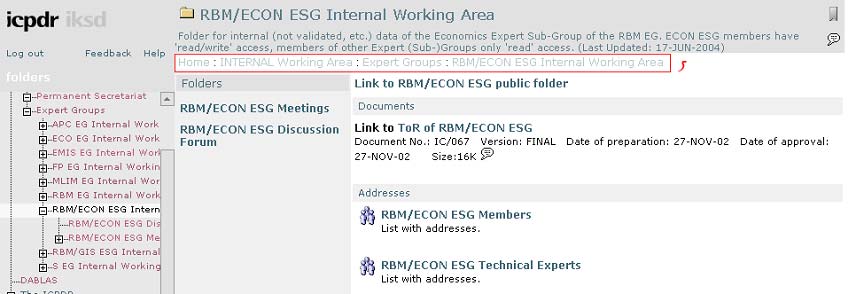
from a technical point of view, the design could be ameliorated. Above, the user sees
the folder title, the folder explanation, and two icons; below, the title "Folders" with
its sub-titles, and some other items at the right, which are rather difficult to develop a
quick mental model of, the "Here you are" bar fails to get the attraction and to help to
orientate the user through the web site.
5.3.2 Supplemental navigation systems
Supplemental navigation systems include sitemaps, indexes, and guides. As they are
external to the basic hierarchy of the site they compose an important, complementary
piece of orientation to the main navigation systems.
"Supplemental navigation systems can be critical factors for ensuring usability and
findability within large web sites. However, they're often not given the care and
feeding the deserve."12
12 L. Rosenfeld & P. Morville, "Information Architecture", 2002
DEWA/GRID-Geneva, 11, Chemin des Anémones, 1219 Châtelaine, Geneva, Switzerland
tel. [4122]917 82 94, fax. [4122]917 80 29, email. Info@grid.unep.ch
Assessment of the ICPDR Information System Danubis 20
ICPDR web site does not offer these orientation and finding help systems. A
sitemap, similar to the table of contents in books or magazines, which shows the
organisation of the document, and which enables a linear as well as random but
selected access to chapters, is not available on the ICPDR web site. There is no way to
see in a bird's perspective the structure, the hierarchy of the site and easily identify
points of interest or entry into the system.
Similar to the index at the end of printed materials,
a site index lists alphabetically keywords or phrases,
without representing the hierarchy. A user can quickly
scan the list to find the item he/she is looking for, and
get them where he/she wants to go. There is no need to
understand the site's structure or hierarchy; a simple
click is sufficient to locate the point of interest. ICPDR
does not offer this option.
A third supplemental navigation system is the guide,
which can take different forms, including guided tours,
tutorials and FAQs. Interestingly, but confusingly,
ICPDR offers the access to all three types of guides
(Figure 9). Again, the balance of the amount of
functionality and thus complexity with the level of needs
by the different user groups one wants to satisfy is very
Figure 9: Additional materials
difficult. Thus, sometimes "less is more", saying that offering the choice of three
different, but closely related guides leads perhaps to too much confusion.
Not clear is furthermore how the "Help" is linked to the three guides. Is this a
fourth way to get help in how to use the IS?
5.4 Searching
systems
The success of the Googles in helping user to find (eventually) what they are
looking for in the World Wide Web, seems to justify the integration of a search within
a single web site. Evidently, the possibility to search a site often helps to quickly and
easily drill down to the specific information one is looking for or, at least, to encircle
the relevant pieces of information. But, implementing a search function can pose some
important problems, such as the selection of what should be searchable, the correct
use of metadata and keywords, the ambiguity of language, the determination of search
zones, etc.
So, some important questions should be answered to assign the necessity of a
search engine for a site:
·
Does the site have enough content?
·
Does one have the resources time, money, expertise to invest into a search
sytem?
·
Are there other, better alternatives, such as indexes or guides, instead?
·
Will your users appreciate a search tool?
DEWA/GRID-Geneva, 11, Chemin des Anémones, 1219 Châtelaine, Geneva, Switzerland
tel. [4122]917 82 94, fax. [4122]917 80 29, email. Info@grid.unep.ch
Assessment of the ICPDR Information System Danubis 21
A search tool will help you, if you have a too much information to browse, if you
deal with fragmented sites, if the user expect it to be there or if you deal with a very
dynamic web site.
The ICPDR search seems to be very, very general, making no evident distinction
between the occurrence of the search term in the title, in the metadata or within the
document. Entering the term "water bodies", already not such a very common term,
shows 515 results without, and still 412 with the use of quotation marks. The term
"Romanian river coding", without quotation marks, results in a list 44 items. Used
with quotation marks, it emits only one item, i.e. the one we were searching for and
that had these three words in the title of the document. But it shows us only a
relevance score of 11%. What does this exactly indicate? Why, although using the
exact title, it does not result in a 100% match? Why is there no explanation, nor some
highlighting of this feature?
The search system implemented by ICPDR indexes all words within the documents
and metadata, without giving priority to titles or keywords or other specific, selected
criteria. Although the algorithm behind is sophisticated, the search results don't seem
to be very relevant. Clearly, these are general issues with search engines. But used
within the web site it poses the danger of having unsatisfied frustrated users. We still
mention the subject here to make aware of the fact of the difficulty and the risk of
setting up a search.
By just using a couple of defined metadata fields, such as "title" and "keywords",
the number of results for a given search will be minimised. On the other hand, the
quality of the search results depends heavily on the quantity and quality of keywords
entered into the metadata field. (Should the words be singular or plural "water body"
or "water bodies"? Does one write the words together "hydromorphological", in two
words "hydro morphological", or separated by a stroke "hydro-morphological"?) A
controlled vocabulary can help to standardise the contextual keywords. Clearly, the
disadvantage of such a system is that the occurrence of entered keywords within the
documents will not be taken into account.
(In this context belongs the fact that at least some of the TEs, who place
documents into the IS, do not fill-in correctly the keywords. Instead, only the title of
the document is copied and pasted into the metadata field.)
DEWA/GRID-Geneva, 11, Chemin des Anémones, 1219 Châtelaine, Geneva, Switzerland
tel. [4122]917 82 94, fax. [4122]917 80 29, email. Info@grid.unep.ch
Assessment of the ICPDR Information System Danubis 22
6 Features & functionality
Each information system is a unique form of symbiotic creature, living from inputs
from different sources, from information retrieval by a wide range of users, and the
interaction and communication between both. Depending on subject, objectives and
user community of the IS, dozens of different features and functionalities can be
implemented in order to make live for both parties "givers" and "takers" easier.
We will briefly list a couple of them and discuss objectives, advantages and
inconveniences.
6.1 Vision and goals
The "Information Management Concept of the ICPDR", 2003, lists a number of
visions and goals. This list is long and very broad. It encompasses almost all objectives,
that an IS can have. In consequence, it is hardly possible to measure success and to
fulfil all objectives. A more distinct, specific, audience-orientated re-definition should
be developed. In addition, the different goals could easily be classified by importance,
thus allowing a focussed work within the development team on specific topics and
functions.
Such a list can be relatively precise, if you know your audiences providers as well
as users. So you could define your goals as the "Provision of a web-based platform for
the distribution of meeting documents"; "Enable technical experts on the country level
to easily and quickly access these documents"; "Provide in-depth query and analysis
capabilities for specific databases for expert users"...
6.2 Standardising document structure
For the reasons of readability and quality assurance, similar documents in respect
to content should be filled in and displayed with the same document format. See the
following example:
Austria - List fo protected Areas
· (side comment: The "fo" is not a fault from our side, but taken from the original.)
· (side comment: There is no homogeneity of character coding here. Why are the
words "List" and "Areas" written with capitals, but "protected" not? --> see
importance of homogeneity in chapter 6.3. Although just a very small, negligible
format problem can lead to user confusion.)
· This Excel sheet holds the relevant information in more than 30 fields!
· There are no explanation about the field titles and what they stand for, which unity
they have eventually, what the different colours used are indicating.
·
Protected areas of Bosnia i Hercegovina
· (side comment: different form of writing as used in the above example. Not only that
this time "areas" is not in capitals, but here first comes the "Protected areas" and
then the country, whereas above it is vice versa. ? --> see importance of
homogeneity in chapter 6.3.)
DEWA/GRID-Geneva, 11, Chemin des Anémones, 1219 Châtelaine, Geneva, Switzerland
tel. [4122]917 82 94, fax. [4122]917 80 29, email. Info@grid.unep.ch
Assessment of the ICPDR Information System Danubis 23
· Unlike the example above, there is no indication below the link of the status date.
· In contrast to the example above, this is a Word file, not an Excel sheet, and it gives
only the name of the protected area, so just one of the 30 fields as used for
Austria.
·
Without going into more details, we want to add here that a couple of other
documents of the same folder are again in completely different formats and structures.
This surely does not help to easily understand the information; it leads to irritation
and frustration, to incoherent data and inexact, not scientifically based reports, if these
data are used.
6.3 Homogeneity
Homogeneity means to always find throughout the web site the same form, the
same style of writing or display. This helps the user to easily and quickly understand
and arrange the information he/she sees.
·
Links are on some pages displayed with a blue underline, on others they are not.
·
Icons for Word documents are displayed from time to time for specific documents
(Figure 11). But a) the icon hasn't been used for all Word documents but only for a
few (why?) and b) to be coherent other document types such as Excel and Pdf
should be displayed the same way, which is (partly) the case on this page but not on
all.
·
Stick to either writing the first letter of all menu items in capitals or in small letters.
But don't mix it up, as
in the example below
(Figure 10).
Figure 11: Icons used for document links
Figure 10: Homogeneity
It seems as if we would be very picky on these small,
negligible issues. (And you are probably right.) But don't underestimate these points:
Accumulated they result in a irritated and later frustrated user, as he/she won't be able
to develop a mental model of the site's structure, of the hierarchy, of the way you
name things etc. So, these are small, and easy to improve issues, which will augment
your user satisfaction.
DEWA/GRID-Geneva, 11, Chemin des Anémones, 1219 Châtelaine, Geneva, Switzerland
tel. [4122]917 82 94, fax. [4122]917 80 29, email. Info@grid.unep.ch
Assessment of the ICPDR Information System Danubis 24
6.4 Personal
homepage
Figure 12: ICPDR Personal homepage
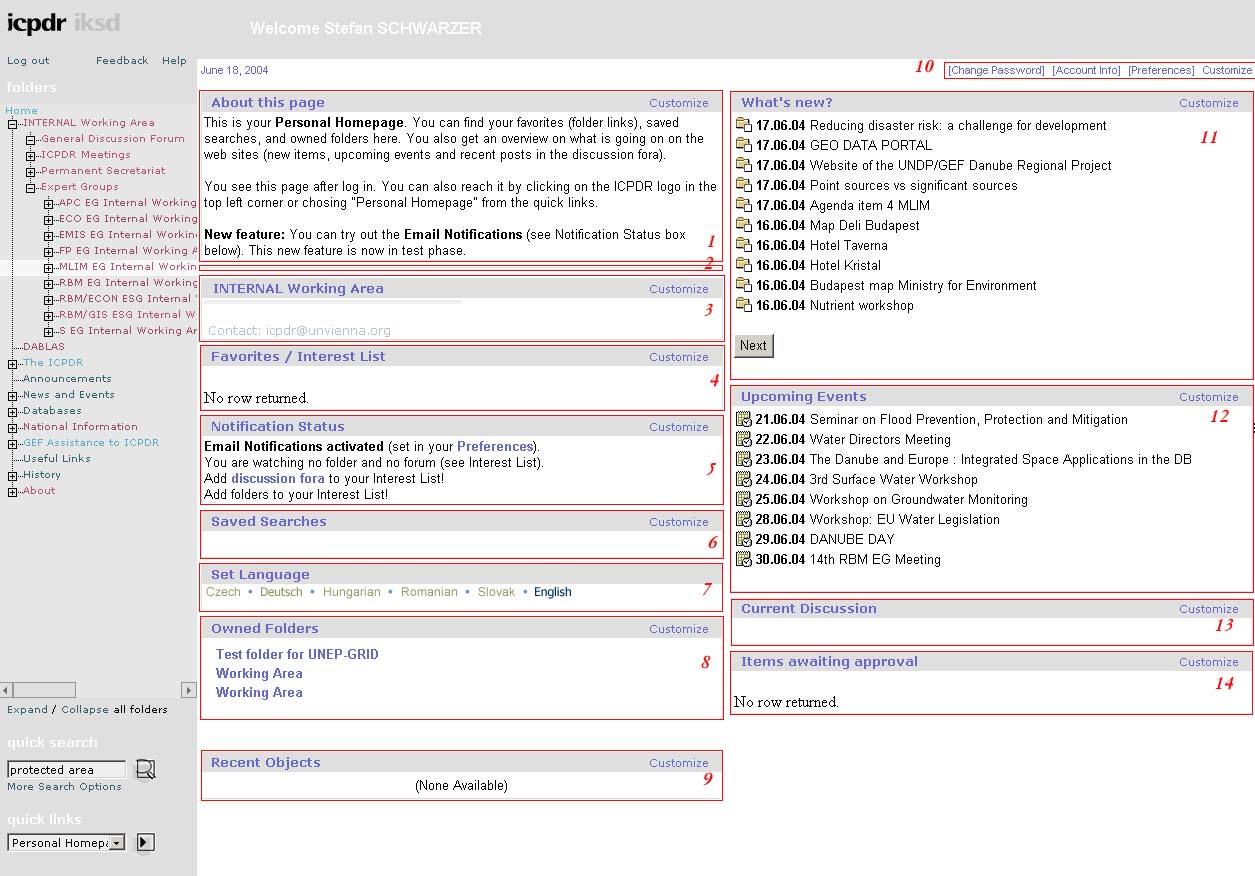
One of the rather interesting features of Danubis is the availability of a "Personal
Homepage" (Figure 12). It is aimed to help the users to stay up-to-date or to reduce the
time and effort for browsing and finding important information. This is achieved
through for example the "What's new?" section, where the user can easily see the most
recently added or updated documents. A list with upcoming events offers a good
overview over what's happening within the network in the next couple of weeks or one
can add documents or folders into a "Favorite" block.
Although the functionality per se looks promising and useful, one has to a) check
the log-statistics to verify if the customising options have been used and b) verify if the
amount of options does not confuse the user. Assuming that most (internal) users have
been trained how to use the system and these functions, one has still to say that the
interface looks quite complex. We see, beside of the multiple navigation and search
systems, 14 boxes, which try to attract the user's attention. How sure are we, that the
users understand all this functionality? How important are these customising and
presentation capabilities? Would it be perhaps possible to offer a simple user interface
with only a few selected for almost everybody important issues and separately an
advanced one with additional options for "expert users"?
DEWA/GRID-Geneva, 11, Chemin des Anémones, 1219 Châtelaine, Geneva, Switzerland
tel. [4122]917 82 94, fax. [4122]917 80 29, email. Info@grid.unep.ch
Assessment of the ICPDR Information System Danubis 25
A weak point of the design of Danubis is the difficulty, once one has plunged into
the system, to find its way back to the "Personal Homepage". One clicks intuitively on
"Home" in the navigation bar, which however leads then back to the homepage of
ICPDR. The sole way to be brought back to the "Personal Homepage" again, is
through the use of the "Quick links". Once one knows that this feature is located at
this place, it is convenient to use. But at least for "first time" users it may take
some time and energy to eventually find one's way through.
6.5 Language
settings
One of the key features of Content Management Systems is often the possibility to
change the language settings, thus enabling fast switching between English, French,
German, Russian etc. Normally, the CMS comes directly with a translation for some
of the widely used titles and commands. For information (e.g. titles, commands,
paragraphs, documents) added by the content managers however, the translation has
to be added manually as well.
Figure 13: Language setting Google
When changing the language options the user expects to get the same interface but
with the newly selected language, as it is the case for example for the Advanced Search
feature of Google (Figure 13): Whatever language the user selects, the interface stays
the same; but all words, terms, phrases, sentences, paragraphs are translated.
So, what happens when the user changes the language settings in Danubis (Figure
14)? A couple of commands and phrases have been changed but one has to look for
them. Even the most basic components, like the search, the navigation menu, the titles
for the boxes ("What's new?") have not been changed. So, what is this option for? Bear
in mind two things:
DEWA/GRID-Geneva, 11, Chemin des Anémones, 1219 Châtelaine, Geneva, Switzerland
tel. [4122]917 82 94, fax. [4122]917 80 29, email. Info@grid.unep.ch
Assessment of the ICPDR Information System Danubis 26
Figure 14: Language setting ICPDR
·
The more functionality one applies to a site, the more difficult the use of it gets.
·
The relation between not properly working functionality and user dissatisfaction is not
linear. Thus, the more performance problems, exponentially more will the user be
irritated and frustrated!
·
Offering a language choice is a very handy, and for the ICPDR perhaps almost a
mandatory option. But it must go along a proper and almost complete translation of
the site. It can't be that only a few sentences pop up in a different language. What
sense does it make? Then better abolish this function completely.
6.6 Discussion
forum
There is probably no urgent need to discuss the failure of the discussion forum.
But it is one typical example of a feature developed without having consulted or
assessed the need of the users. Adding new features is always a two-sided sword: on one
hand users often seem to be satisfied with the existing functionality of ISs; on the
other hand, when a new, "cool" feature has been added, they eventually don't want to
miss it anymore. In such a way, the discussion forum could have been become as well a
hot add-on. But it didn't.
In theory, the tool developed tries to strengthen the interaction between team
members, as well as the sharing of knowledge. So, being such an important tool and
seeing the success of discussion forums in the WWW -, why didn't it succeed?
DEWA/GRID-Geneva, 11, Chemin des Anémones, 1219 Châtelaine, Geneva, Switzerland
tel. [4122]917 82 94, fax. [4122]917 80 29, email. Info@grid.unep.ch
Assessment of the ICPDR Information System Danubis 27
Possibly, because the user community uses the Danubis platform only for
downloading documents, but not for "sharing" knowledge. Possibly, because the users
are mainly engaged with other projects and fulfil certain tasks related to Danubis only
in addition to their normal workload. So there is no time and energy left for ongoing
discussions. Perhaps, because emailing is still the more normal, well-known form of
knowledge sharing between people. And discussion forums are perhaps for certain
audiences a too fancy, too technical tool, which can't be accepted for daily usage.
In how much did the decision to set-up a discussion forum take this (or other
different or additional) considerations into account? Have the users been interviewed
beforehand?
6.7 Repeated
items
It has become a widely used habit, to display at the left side of the web page the
main navigation menu, which, when an item has been selected, loads the chosen page
into the central part of the browser. Sometimes, an additional sub-menu is presented,
but either it is slightly hidden that it doesn't take up important parts of the page, or it
is not in addition to the main menu. In Figure 15 the following navigation options are
displayed in the main navigation menu, within the "content page" and one of this
items again at the right side. This is a) doubled listing and b) irritating that one of the
four submenu items ("General Discussion Forum") is listed again separately.
Figure 15: Repeated navigation links
6.8 Navigation
A few impressions:
·
Complex, difficult, heavy, unstructured....
·
Contextual navigation via hyperlinks not existent between the different Expert
Groups areas.
·
What does "History" mean? History of what? And if it's related to the ICPDR,
why isn't it listed under the respective item?
·
What does "folders" mean? What stands it for? Why can't I click on it?
·
What is the difference between "Announcements" and "News and Events"?
Commonly a web site has either one of those notification items, but not both.
How different is "News" and "Announcement"?
DEWA/GRID-Geneva, 11, Chemin des Anémones, 1219 Châtelaine, Geneva, Switzerland
tel. [4122]917 82 94, fax. [4122]917 80 29, email. Info@grid.unep.ch
Assessment of the ICPDR Information System Danubis 28
·
Why can't the user see directly on the homepage a general description of
ICPDRs projects, spatial range and objectives? Or is it not necessary for ICPDR
to present itself to the users?
·
The "Quick links" items are partly invisible, as the box is to small.
·
The "Expand/Collapse all folders" option leads to Javascript errors, browser
hang-ups, waiting-time, ...
·
The navigation menu is complex and heavy. One has to wait sometimes a
couple of seconds to see the changes as the design structure seems to be very
heavy
·
Why is "Dablas" not a sub-item of the "Internal Working Area"? It's irritating to
see it only when being logged in but then as a separate item within the main
menu.
·
Let's go through the following example (Figure 16):
Figure 16: Navigation issues
·
Box 1 is the sub-menu of "List of protected areas". Easy to understand.
·
Box 2 holds a header called "Folders". Hmmm, what does this mean? A
folder yes, the "Folder"-nature is impressed by the system, but the
irritations caused by this should be mentioned here is known to
everyone when using Windows Explorer. But this isn't Windows
Explorer. And why does
·
Box 3 list exactly under the title "Folders" the same items as listed as
sub-menu in Box 1? This causes irritations.
·
And, as box 4, titled "General" is on the same level as "Folders", what
distinguishes these two, or better where is the topical relation between
these two?
·
One has to read box 5 to guess (!) that this is somewhat an information
encompassing the whole geographic area.
·
But then why not, in a logical reasoning, list it under (or perhaps above)
the country list, as for example item "Basin-wide information"?
DEWA/GRID-Geneva, 11, Chemin des Anémones, 1219 Châtelaine, Geneva, Switzerland
tel. [4122]917 82 94, fax. [4122]917 80 29, email. Info@grid.unep.ch
Assessment of the ICPDR Information System Danubis 29
·
When one clicks on Expert Groups, a submenu unfolds only on the middle part
of the page. The submenu within the main navigation
system only opens, strange enough when one clicks on
"ICPDR Meetings"...
·
Or see the following (Figure 17): One browses the menu
item "Databases", clicks on "Bucharest Declaration
Database", and suddenly ends up with the menu
"Internal Working Area Expert Groups MLIM EG
Internal Working Area MLIM Databases Bucharest
Declaration Database". This is really irritating.
6.9 Structure
As discussed already in chapter 5.1, the structure of the IS
hasn't been well developed. Another example is the fact that
there are no interlinkages between the different EG folders and
Figure 17: Changing menu
not topical, only organisational set-up. So if somebody looks for
a document on groundwater, he/she has to either browse all EG
folders or use the search instead.
Another structural
problem is the different
folder structure within the
EGs (Figure 18). There is
the problem of naming and
that of ordering: Some EGs
call a folder "Working
Documents", another just
"Documents", a third
"related documents". In
one group one finds the
item "Related
information", in another
the term "Related
activities". In one group the
Figure 18: Diverging folder structure
"Dicussion Forum" is the
first entry, in another the
second, in again another the third on the list.
6.10 Feature list
No matter if an old IS shall be further developed and enhanced or a new system
put into place, a list of requirements for such a system should, and especially when
selecting a new one, must be developed. There is no single best list, instead, every
organisation has unique needs.
DEWA/GRID-Geneva, 11, Chemin des Anémones, 1219 Châtelaine, Geneva, Switzerland
tel. [4122]917 82 94, fax. [4122]917 80 29, email. Info@grid.unep.ch
Assessment of the ICPDR Information System Danubis 30
ICPDR has not yet come up with such a list. This is rather unfortunate, as only
with such a list one can pinpoint and discuss needs, as well as measure progress. This
list is not only necessary for follow-on activities, but should provide guidance and
feedback in the process of evaluation and user satisfaction. The development of such a
list must include all stakeholders.
A short list of current features and its importance (from our perspective) for
ICPDR has been attached as Annex I. Again: It is all about finding the balance
between the amount of functionality and thus complexity with the level of needs by
the different user groups one wants to satisfy. Thus, as the appended list is indicating:
There are means of simplifying the Danubis, as unnecessary functions could be
displaced (i.e. hidden as "Advanced functions" only for experienced users) or
completely eliminated.
Notification is a good example of a successful, well-accepted and well-reasoned
function. Slightly less than 50% (209) of the registered users (463) do have this
function activated.
Even though the possibility to subscribe to one ore more folders are less used, still
30% of the users do have activated this function, which is a reasonable percentage.
Some features, such as "Customize" on the Personal Homepage will probably
hardly be used by many users. Instead, the majority will stick to some basic, very simple
to understand and change options.
6.11 Quality control
To maintain a certain level of quality, each entry into the system must be
controlled and verified. But as each EG folder is maintained by the TE of that group,
there are very personal levels of quality control and assurance. There are no guidelines
and no common understanding. Who is further responsible for the information in
other, not-EG folders?
How can this level of QC & QA be assured, when for example we find a folder,
which offers information about national protected areas for six or seven countries, but
each
·
in a different format (Word, Excel),
·
in a different form (table, list),
·
with different number of fields (one to 30 fields),
·
without the description of the fields,
·
without the units of the fields,
·
without a date stamp,
·
...
6.12 Long-term strategy
Beside the important step of defining the goals and visions, a middle- and long-
term strategy must be developed. How do you want that the system looks like in one,
DEWA/GRID-Geneva, 11, Chemin des Anémones, 1219 Châtelaine, Geneva, Switzerland
tel. [4122]917 82 94, fax. [4122]917 80 29, email. Info@grid.unep.ch
Assessment of the ICPDR Information System Danubis 31
two, five years? What amount and type of workload do you expect that it supports?
Should it be manageable by only one administrator, perhaps only at half-time? What
happens if the main developer leaves the project? Are you prepared for this? Will it
cost much time/money/resources to get somebody from outside familiar with the
system? Do you want to play a at-the-edge-of-technology-role, thus showing your
capabilities but eventually missing the needs of your clients? Or do you want to
maintain easily and at low-cost a system, thus truncating the IS to the very essential
parts?
6.13 Communication
It is difficult to judge in how far there has been a communication between HQ and
the members of Danubis before developing additional functionality. It is a common
problem, that ISs gain over the time an own momentum and that the development is
undertaken just for its own sake and not to respond to the user needs. Typical for such
a system is as well a lack of general communication between the developers and
decision-makers and the user community. Has there for example been a demand for a
discussion forum? The idea in itself is a good one, but without the input from the
users, as it is the case, it doesn't serve anything, at the very best only time and money
has been spent, but eventually even worse, acceptance and credibility have been lost.
6.14 Databases
It seems that generally the databases have been appreciated and are used. Naturally,
only a selected audience uses the query-functionality extensively, as one must be
technically skilled to understand and make use of the data. Minor changes could be
applied to the query interfaces, developing for example a simple and advanced
interface. This would allow "normal" users to query the database as well without
getting confused by the complete set of functionality. Additional modules, such as for
drawing on-the-fly maps and graphs, should be seriously considered. Although one has
to ask the question if this opens the audience to user groups which are not necessarily
part of the intended audience.
The language used for the different query-options is very technical; sometimes even
only abbreviations or units (for example "%") are used. This surely will not facilitate
the use of the system!!
A question of credibility is the question if the databases are up-to-date. What idea
of an organisation does the user get if, in the database's most recent year is 2000? Sure,
sometimes it is inevitable as the acquisition of recent data is difficult, time-consuming
and expensive. But staying up-to-date with the data is of utmost importance.
DEWA/GRID-Geneva, 11, Chemin des Anémones, 1219 Châtelaine, Geneva, Switzerland
tel. [4122]917 82 94, fax. [4122]917 80 29, email. Info@grid.unep.ch
Assessment of the ICPDR Information System Danubis 32
6.15 Layout
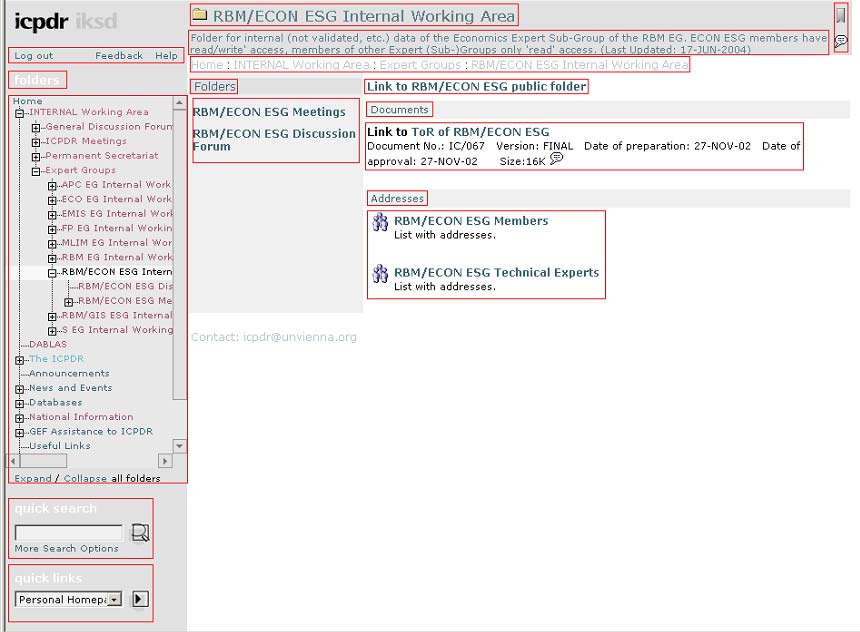
The layout and the design of the interface (Figure 19) could be extensively
ameliorated. Headers, titles, subtitles, date, text are often too identical and too difficult
to distinguish. A user, coming to a page like the one below, can't easily build a model.
The differences of navigation, headers and content must be more easily visible, using
clearly different forms and styles. Some reaction from the users were "boring colours",
"no attractive design", "too complex", thus indicating an improvement in design.
Figure 19: Layout with many elements
6.16 People
We have already discussed the need to concentrate on the user needs. Now, a
slightly different point of view will be discussed. One of the team members said:
"People make the story!" Honestly, one does not get this impression when bumping on
the homepage and when surfing around. Somewhere, deep in the hierarchy, different
address books can be found (why several?), thus indicating the participatory approach
of the project. It is difficult to develop a sort of "team spirit" or "corporate identity" as
DEWA/GRID-Geneva, 11, Chemin des Anémones, 1219 Châtelaine, Geneva, Switzerland
tel. [4122]917 82 94, fax. [4122]917 80 29, email. Info@grid.unep.ch
Assessment of the ICPDR Information System Danubis 33
a member of the project. Perhaps this is not necessary as the members are only
working in addition to their normal tasks for the project. Still, it would be nice to see
the faces behind the big picture, to become more familiar with those people on whom
the system builds.
A real staff directory could help out. Some photos of those involved. A short
description of who they are and what they do, how there are involved into the project.
The flag already used is a nice feature to show the international design of the project.
The homepage should be ameliorated by adding some faces, for example a photo of
one of the trainings.
6.17 Geography
The geography is within the commission's title: Danube. But why doesn't the user
see any maps? Ok, somewhere there is a map, even somewhat dynamic. But for many
visitors it would be helpful and indicative for the project to see the geographical
extent of the region, most naturally already on the homepage. To see the countries
involved and thus the international design of the project helps in the identification
process.
6.18 Accessibility
The allocation of access rights to Danubis has been handled with care and was
relatively restrictive. It seems that this reservation hasn't been found complete
satisfaction between all team members. This is a management and thus
communication problem, which should be solved to align all major players in the
"philosophy" of the usage of the Danubis.
6.19 Intro texts
Many parts of the Internal Working Area, but also of the public section miss a
possibility to see the sub-site in respect to the global picture. An explanation on each
page, giving a contextual "where you are and what you can expect" introduction, will
help to grab the smaller pieces within the big one. This should help users to
understand the
content and the
objective of
specific parts of the
web site.
Naturally, this
component of an
IS should be used
carefully, as it
Figure 20: No introduction
DEWA/GRID-Geneva, 11, Chemin des Anémones, 1219 Châtelaine, Geneva, Switzerland
tel. [4122]917 82 94, fax. [4122]917 80 29, email. Info@grid.unep.ch
Assessment of the ICPDR Information System Danubis 34
shouldn't consume too much space, but should be informative enough so that users
who are not so familiar with the system still do understand where they are.
Unfortunately quite a lot of the Danubis sub-sites do not offer this added
information. Thus, it is very difficult to understand what these sub-sites are about and
what content one has to expect.
6.20 Homepage
The homepage as shown in Figure 7 is light (in terms of kBytes, number of items
and colour), which makes it attractive. Some icons and small images with not much of
text render it relatively easy to get an overview.
Nevertheless, this page seems to be developed for in-house use mainly, as there are
no indications of what the ICPDR and its work is about, who is involved and which
region it covers. This is a major issue the user should be welcomed on the homepage!
Not necessary to right two pages of details about ICPDR. But a small introduction, a
map as a background image, a photo of a meeting could help to let the user feel the
importance of this project.
Furthermore, as already discussed elsewhere, distinct menus for topical and
geographical browsing would ensure a better understanding of what the project is
about.
6.21 Management structures
A very hypothetical statement could be made by users, when exploring the rigid,
hierarchical, clearly separated structure of the EGs within the "Internal Working Area"
(Figure 21): Are these EGs in reality (i.e. not only within the IS) as much (i.e. not at
all) associated and linked as in the Danubis?
It seems that the groups have been separated
voluntarily, without trying to install a form of
interconnectivity, of "corporate identity" of all people
involved. Sure, this is a provocative comment. But because
a) there is hardly any additional text on the paged and b)
hyperlinks are mainly used to link to documents, the big
advantage (and actually one of the main reasons of
existence of the WWW) of connecting pieces of
information from different pages, sections, sub-sites, and
Figure 21: EG structure
over the whole Internet are not used at all.
As the main use of the IS will in the future be as today
the upload/download of textual documents, there is perhaps no real need and surely
no simple solution to it. But some users mentioned that they were looking sometimes
in other EG folders for documents.
DEWA/GRID-Geneva, 11, Chemin des Anémones, 1219 Châtelaine, Geneva, Switzerland
tel. [4122]917 82 94, fax. [4122]917 80 29, email. Info@grid.unep.ch
Assessment of the ICPDR Information System Danubis 35
So, one possibility would be the topical arrangement of the content. This would
enable a cross-group listing of content, of documents, or at least parts of documents. A
stronger collaboration and a higher benefit of the produced information would result.
6.22 Up-to-datedness
The destiny of an IS harbouring a lot of documents is that it turns itself slowly into
an archive. Where only small parts of the system are actively used, more and more
elements are out-of-date and not anymore consulted. At a certain stage on should ask if
this development is accepted or if measures have to be taken, to eliminate this "ageing
process". Does one want to end up with 95% archiving and only 5% actuality? Is the
information produced over the years still valued? Is it used? Or could it be a) deleted or
at least b) displaced in a special archive? Are there so many documents that it hampers
browsing and findability? Is there a rule telling for how long documents shall be
provided via the IS? The IS comes with the feature of the expiring date of an item. But
all are normally set to never.
One should think about the predicament of "navigationability" (the ease of
browsing, searching, finding) and archiving. Be sure to clean up your spaces from time
to time. Develop a real archive, which could be just an easy FTP server (which results
in almost no software and administration costs). Rethink the use of the "Date of
expiration" feature in the properties.
6.23 Searches
The searches within some of the Expert Groups
don't indicate where they search (Figure 22). Do they
query only documents published within the same
folder? Or do they take the Danubis as a whole into
consideration? The search result page doesn't
mention it either. So the user is left in some
uncertainty: does this (local) search resemble the
Figure 22: Search within an EG
main search interface which appears on every page
wherever one is in the IS or if it is a search apart.
6.24 Document sizes
Although covering parts of the European continent, due to different historical and
thus financial and infrastructural reasons, some of the countries involved in the
ICPDR project do not have the fastest Internet connections. Some even do not have a
Flatrate, but have to dial into the Net by modem, which immensely slows down the
speed of traffic. Even in Geneva, where the authors of this document are provided
with very high connectivity, the access to Danubis has been relatively slow and
hesitant.
DEWA/GRID-Geneva, 11, Chemin des Anémones, 1219 Châtelaine, Geneva, Switzerland
tel. [4122]917 82 94, fax. [4122]917 80 29, email. Info@grid.unep.ch
Assessment of the ICPDR Information System Danubis 36
Now, dealing with simple HTML files for browsing information does not pose a
major problem when using modems or other low-speed connections. But as soon as
one has to download documents, be it Word or PDF files, data tables or images, one
really runs into problems.
So, an effort must be undertaken to assure that these partners do have the
possibility to connect to the IS and access the published information, without having
too much disadvantages and troubles due to their network connections. But it seems
that not much attention has been paid to publish only light documents many Word
files and a lot of the photos for example are over 1 MB in size. This poses a certain risk
to loose, due to frustration, these collaborators. Be aware, that trying to (re-)download
a couple of times lengthy files, be it as a result of the cut off by transmission errors or
the truncation of the telephone line, gets users really frustrated.
Documents shouldn't be solely placed either as whole documents or only chapter-
wise. The download of huge files, eventually blown up by photos, screenshots or other
place-consuming entities, is sometimes difficult for centres that don't have a viable and
fast Internet connection. On the other side, downloading chapter by chapter is an
inefficient, displeasing and frustrating procedure. Not only because the user has to
download separately 15 files (as is the case with the Annual Report 2002), but
concatenating the document at the PC for printing purposes is a rather unsatisfying
job.
6.25 Help system
The help file of the ICPDR is nicely done and well documented. The icons used
for the different functions, displayed within the normal pages of the IS and, for
orientation purposes again within the help, give the user the possibility to quickly
browse the help to find and recognise the chapter of interest.
There are only two weak points:
1) There is no direct link between a specific problem, from where the user wants
to consult the help, and the according chapter within the help. It would be very
useful to see directly the paragraph that covers the subject the user has
problems with.
2) The second point is rather simple: Users don't consult the help. Although this
phrase is somewhat exaggerated, it is clear that only a minority of users use this
additional resource in order to solve a problem or get help in how to use the
system.
DEWA/GRID-Geneva, 11, Chemin des Anémones, 1219 Châtelaine, Geneva, Switzerland
tel. [4122]917 82 94, fax. [4122]917 80 29, email. Info@grid.unep.ch
Assessment of the ICPDR Information System Danubis 37
6.26 Metadata
The field of metadata
is probably one of the
most avoided and almost
hated domains that exist.
Nobody likes it, hardly
anybody does it, a few
however do it, but many
of those not correctly.
Nevertheless, the
importance of proper
metadata-editing can't be
underestimated when
dealing with major
information loads. There
are two important aspects
to be analysed: Have the
proper fields been chosen?
And are they correctly
Figure 23: Item property sheet I
filled?
Figure 24: Item property sheet II
But anyway, why should you care about metadata? Simply, because metadata are
the powerful tool that link the information with the users. By tagging documents and
other information objects with, hopefully, controlled vocabulary metadata, we enable
DEWA/GRID-Geneva, 11, Chemin des Anémones, 1219 Châtelaine, Geneva, Switzerland
tel. [4122]917 82 94, fax. [4122]917 80 29, email. Info@grid.unep.ch
Assessment of the ICPDR Information System Danubis 38
powerful searching and browsing. The metadata fields enable a quick and very efficient
search and result thus in meaningful and quantitative diminished results.
The following three examples show the strengths as well as the weaknesses of
metadata as used in ICPDR.
Example 1 (Figure 23) lacks for instance a couple of the most basic metadata
information: There is no description of the document, no Perspectives/Topics have
been indicated, and not one keyword has been filled in. This is a rather serious
problem and concerns heavily the quality assurance of the whole system in the long
run.
Figure 25: Item property sheet III
Example 2 (Figure 24) shows in contrary nicely how fields are more or less properly
entered: a rather extensive description, indications to Perspectives/Topics and
Keywords. Unfortunately there has been no author indicated.
Example 3 (Figure 25) finally comes up with two problems: 1) Although the
"MIME Type" is indicating a Word document, the "Category" is speaking differently
of a "Database". So, what is it now, this information object? Document or database?
Furthermore in comparison to example 2 it seems that the two fields
"Perspectives/Topics" and "Keywords" have been switched: the keywords give rather
the topics, the other field list keywords.
These three examples show a common problem: Although attention has been paid
on the development level to provide a platform for exact and proper documentation,
the people who enter these data either don't do it at all or very differently. The
objective must be to obtain the same metadata from five different people when
DEWA/GRID-Geneva, 11, Chemin des Anémones, 1219 Châtelaine, Geneva, Switzerland
tel. [4122]917 82 94, fax. [4122]917 80 29, email. Info@grid.unep.ch
Assessment of the ICPDR Information System Danubis 39
entering the metadata for a given document. On the level of "Perspectives/Topics"
and "Keywords" a controlled vocabulary can easily be deployed to channel the use of a
specific, harmonious set of semantic words. In addition, one person should be engaged
to control the quality of the entered metadata.
DEWA/GRID-Geneva, 11, Chemin des Anémones, 1219 Châtelaine, Geneva, Switzerland
tel. [4122]917 82 94, fax. [4122]917 80 29, email. Info@grid.unep.ch
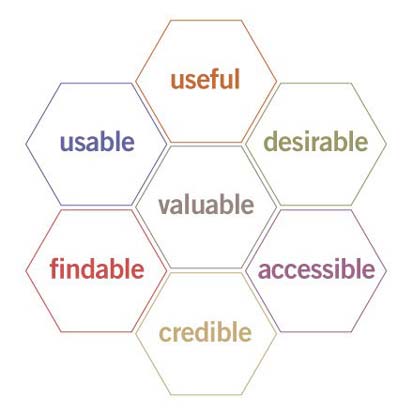
Assessment of the ICPDR Information System Danubis 40
7 Recommendations
Whatever goal one is trying to reach, the development of a simple, easy-and-fast-to-
understand user interface ("Keep it simple, stupid!" the KISS principle) can never be
underestimated. Features that are familiar to the developers and core users often
provoke the appearance of a big question mark in the eyes of the general user, and may
lead in the next step to irritations and eventually frustration.
As already mentioned, the most important "rules" for the development of an
successful IS are:
simple interface clear structure easy navigation logical labelling
The user experience honeycomb
diagram13 shows in a different form
the factors involved in user-centred
design. It helps to define priorities in
web site (re-)design and shows all
major priority issues at play.
Much of what has been already
discussed in the preceding chapters
builds the link to these segments.
Finally, the whole report is circling
around these elements: Is the site
useful? Is it easily accessible? Can one
quickly find what one is looking for?
Is the information of good quality? Do Figure 26: Honeycomb diagram
they matter to my work? etc.
Thus, having already criticised, discussed and suggested, in this section we will only
list the most apparent and urgent, aggregated proposals. Although no direct link has
been established between the subjects described below and the honeycomb, the
mention of this model should help to connect content & functionality to user needs.
For example, "findable" refers to the possibility to use the search engine for accessing
specific information pieces by entering keywords. But it refers at the same time to a
clear structure of the "folders", so that the user can "find" documents by browsing
through the system. "Usable" can refer to the extent of functionality of the databases
how much does a user really need for a proper display of values. Or are the calendar
functions really "usable"? And so on...
The following order of the items is not by random, but tries to follow, say: the
construction of a house, beginning by laying a robust fundament, constructing then
walls and later the roof, adding doors and windows, and later curtains and furniture.
13 Peter Morville, 2004, http://semanticstudios.com/publications/semantics/000029.php
DEWA/GRID-Geneva, 11, Chemin des Anémones, 1219 Châtelaine, Geneva, Switzerland
tel. [4122]917 82 94, fax. [4122]917 80 29, email. Info@grid.unep.ch
Assessment of the ICPDR Information System Danubis 41
So, some items are based on others (no (solid) wall without a (proper) fundament so
no successful search without good labelling). But at the same time, they interact the
construction of the floor in the house can't be separated from the design of stairs and
the size of the rooms. There is a strong interaction between all elements. This means,
that a "simple", clearly separated listing does not correctly reflect the fact that we are
speaking here about a "system", i.e. a group of independent but interrelated elements
comprising a unified whole. To give an example: The user needs influence the goals
and visions for the IS. These needs affect the design of the site, which in turn is
dependant of the underlying structure and labelling system. All these components
influence the search system, which's success on the other side depends deeply on
correct metadata and a defined labelling system or thesaurus...
Furthermore, the paragraphs below form a mix of recommendations from our side
and questions we pose, but should be answered by ICPDR including the inputs from
headquarters and the experts in the countries. Thus, final recommendations on clear
definitions of visions, goals and long-term strategy for the IS can hardly be presented
by the authors, as too many questions cannot be answered and will surely take some
effort within ICPDR to clarify and define. This said, our advice would go along the
following lines: Follow the guidelines mentioned in the above chapters to develop a
sound, well-organised and labelled information system with clear and unambiguous
navigation. In order to achieve this, the transition to another CMS is indispensable,
but must be undertaken with great care, good research and consideration of the long-
term goals. Concentrate on the direct need of the users, which is the access to meeting
documents, the databases, the event-calendar (with less priority). By enabling easy
access through linking, browsing and searching to these information chunks, users will
automatically be attracted and motivated to explore further functionality and content
of the IS. A better cooperation and exchange between the managing parties (i.e. system
administrators, developers, TEs, and also the users) should be encouraged and
ensured.
7.1 Clarify the user needs
After consultations with the TEs and some EG members, we can see a clearly
defined and specific use: downloading documents in the context of upcoming
meetings. There is only a minor wish to access additional information, either from
other workgroups, from the public part of the ICPDR web site or from the databases.
Thus, the accessibility, including the ease of browsing, searching, and asking (the three
main ways of accessing information) should be made as easy as possible. Once
navigation has become easier (through better labelling, clearer structure, more
attractive design etc.), users will eventually use the whole range of possibilities of an IS
more extensively.
Undertake an in-depth logfile analysis, showing major habits, user behaviours, user
preferences. Try to highlight the most important, most-used functions. Figure out if
people find what they are looking for; what customising functions they use; how much
time they spend on the Personal Homepage; how they try to find specific information;
DEWA/GRID-Geneva, 11, Chemin des Anémones, 1219 Châtelaine, Geneva, Switzerland
tel. [4122]917 82 94, fax. [4122]917 80 29, email. Info@grid.unep.ch
Assessment of the ICPDR Information System Danubis 42
etc. This normally helps a lot to get a clearer picture of the way people use an existing
IS and as well, how they do not use it.
7.2 Redefine
your
goals
Redefine your goals. Do this not in broad terms (not as general as in the
Information Strategy report), but describe in exact terms what you really want to
achieve. For example: Provide a platform where the Expert Group managers can
publish documents related to upcoming or past meetings for download for all
participating members. Provide databases for access to detailed data in the form of
tables for specific expert members. Add (carto-)graphic capabilities to enable as well the
use of these databases for non-experienced users, for whom data tables are a numerical
puzzle. These decisions help to augment your credibility.
7.3 Develop a conceptual model
Develop a conceptual model of and for the website. Be sure to place the user,
rather than the website, at the centre. Figure out the "information clouds" and the
"functional chunks" that you want to integrate. How do you label these parts? How do
you organise them? How do they relate to each other? How do they play together?
7.4 Reorganise the structure
The entire hierarchical, topical and functional structure of the Danubis should be
revised and reorganised. A clear, easy-to-follow and especially logically developed and
well-labelled site structure is of utmost importance and would greatly facilitate finding
the right content. Enable not only a management-hierarchical (e.g. clear separation
between the EGs), but also a topical and geographical entry into the system.
7.5 Simplify the design
Until now, we have placed much emphasis on the more fundamental, structural
elements, such as organisation, labelling and navigation systems. Nevertheless, this is
only one side of the coin. The other is the development of an attractive and intuitive
(web) design of the information system. Our impression is that some of the elements
used within the graphical design haven't been correctly or efficiently applied in order
to facilitate browsing and finding. Headings are not always intuitively recognisable as
such, sometimes used as hyperlinks; titles not separated from content in form or style;
colours not applied to indicate certain properties of the object.
The main interface, be it the public site or the Internal Working Area, should be
simple. As the main objectives of the principal audience can be relatively well-defined
accessing documents in relation to meetings there is no real need to add extensive
functionality. In addition to the most basic needs, a couple of interesting and useful
DEWA/GRID-Geneva, 11, Chemin des Anémones, 1219 Châtelaine, Geneva, Switzerland
tel. [4122]917 82 94, fax. [4122]917 80 29, email. Info@grid.unep.ch
Assessment of the ICPDR Information System Danubis 43
features can be included, such as the Email alert, the "What's new?" section, and a list
of Upcoming events. If additional, more complex functionality is of a certain
importance for the IS, then these could be de-emphasized by an "Advanced User
Functions"-button.
The "Internal Working Area" should be closely linked to the Public Site, as this
facilitates the use of both parts by the project members. The transfer of expertise (i.e.
in form of documents) from the internal to the external section will rise with the re-
design of the new public web site. Thus, the design and the structure of both parts
should be consistent and coherent.
7.6 Revise the search
We recommend revising the search. This can be achieved on one side by assuring
the correct entering of the metadata fields especially "title", "topic" and "keywords".
More specifically, both fields "topics" and "keywords" should be driven by a controlled
vocabulary. This enables at least the use of a homogenous set of keywords. Even more
sophisticated, a thesaurus could be implemented, using semantic relationships and
term rotations.
On the other hand, the search engine should then search in the first step not in all
metadata fields and the whole document, but only in a limited number of these fields,
especially in "title", "topic" and "keywords". Only if the user does not find what
he/she is looking for, he/she could be advised to search within all documents.
7.7 Review the databases
The databases are evidently not that much used; nevertheless, they form an
important part of Danubis. Mainly used by some experts, the functionality could be
enhanced and expanded by adding a (excel-) graphic and cartographic module.
Additional functionality should be limited to a minimum; supplementary query
features could be hidden from the principal page and made available through an
"advanced users"-button. Data must be kept up-to-date for credibility reasons.
7.8 Generate a feature list
Set-up a list of features the IS should offer. Allocate a level of importance or
relevance (e.g. "mandatory/critical", "important", "desirable") and an explanation for
the reason why this function has to exist. The list can be rather long, easily covering
several dozens of features. The list will help you to
·
find out more about your needs,
·
define your functional requirements,
·
serve as a basis for further improvements,
·
lay the foundation for the search for an alternative content management system.
DEWA/GRID-Geneva, 11, Chemin des Anémones, 1219 Châtelaine, Geneva, Switzerland
tel. [4122]917 82 94, fax. [4122]917 80 29, email. Info@grid.unep.ch
Assessment of the ICPDR Information System Danubis 44
Only when you have finished this list of required features and you stick to your
decision to migrate to another CMS you should engage yourself or somebody from
outside to do some research on the CMS market. The probability is high that you can
find a CMS that offers a high percentage of the functionality that you need. Perhaps
the system offers the option to add modules, which could then be programmed in-
house? A lot of the CMS products one can get for free or for a fairly inexpensive price
are based on a lot of experience and a wide community of developers. It offers
discussion forums and a palette of additional modules contributed by the community.
DEWA/GRID-Geneva, 11, Chemin des Anémones, 1219 Châtelaine, Geneva, Switzerland
tel. [4122]917 82 94, fax. [4122]917 80 29, email. Info@grid.unep.ch
Assessment of the ICPDR Information System Danubis 45
8 Annex I: Feature list
DEWA/GRID-Geneva, 11, Chemin des Anémones, 1219 Châtelaine, Geneva, Switzerland
tel. [4122]917 82 94, fax. [4122]917 80 29, email. Info@grid.unep.ch
Assessment of the ICPDR Information System Danubis 46
DEWA/GRID-Geneva, 11, Chemin des Anémones, 1219 Châtelaine, Geneva, Switzerland
tel. [4122]917 82 94, fax. [4122]917 80 29, email. Info@grid.unep.ch